
Kitchen screen & KOT printing

KOT printing and a kitchen screen for your restaurant.

Orders go from the waiter’s phone straight to the right counter — on a kitchen screen, a printed KOT, or both. No slips, no shouting, no “which table?”.

14 days free · no card needed · printer optional

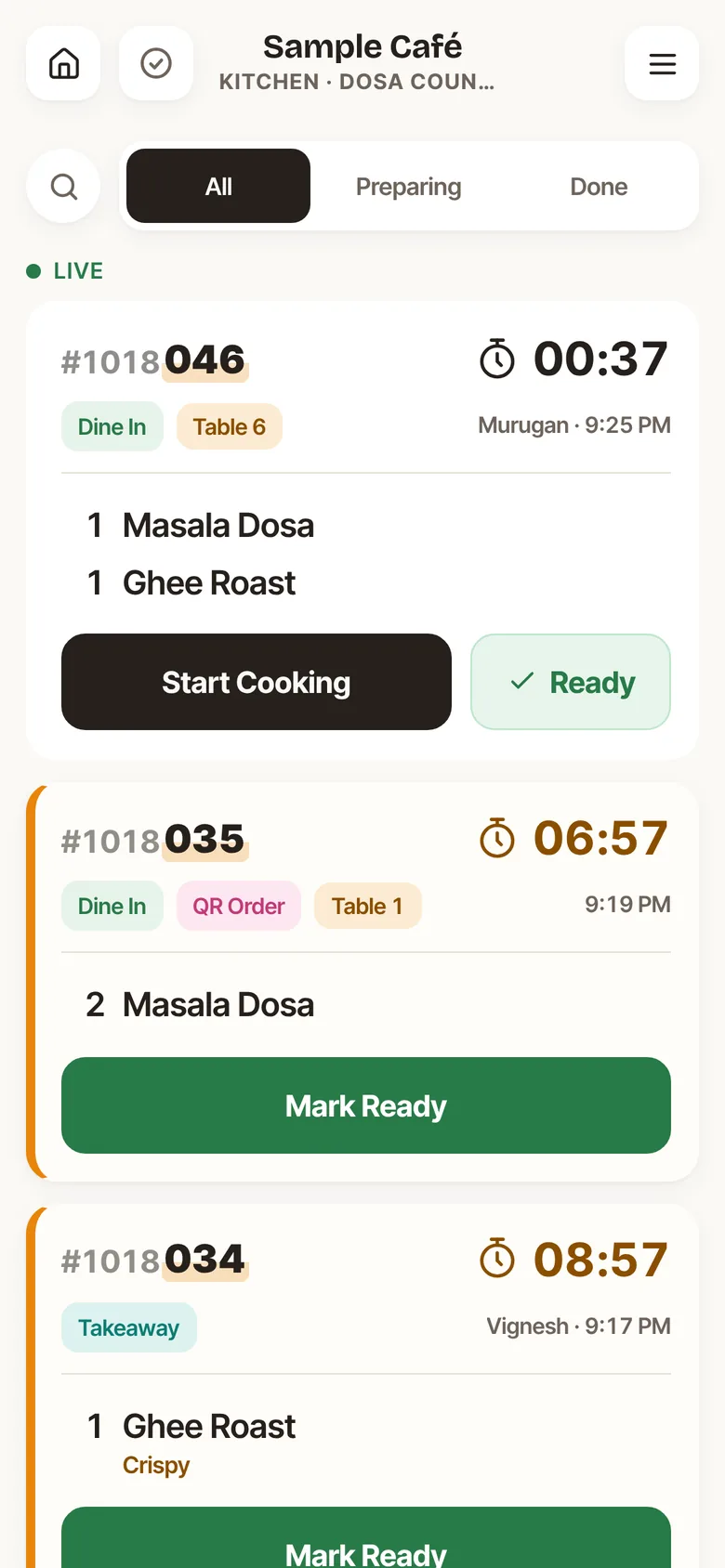
Delobee kitchen screen for the dosa counter with live tickets, timers, and Start Cooking and Mark Ready buttons — sample data
Real kitchen screen · ticket illustrated · sample data

01How orders reach the kitchen

One tap from the table. The right counter gets it.

  1. 1Waiter

    Sends the order

    From any phone — Android or iPhone. Notes like “Less oil” go with each dish.

  2. 2Delobee

    Splits it by station

    Dosas to the dosa counter, juices to the juice bar. Each station gets only its dishes.

  3. 3Kitchen

    Screen, paper or both

    The ticket appears on that counter’s screen and, if you’ve set one up, prints as a KOT.

  4. 4Waiter

    Hears it’s ready

    When the cook taps Ready, the waiter knows to pick it up.

02Kitchen screen

A kitchen screen on any phone or tablet.

Put a phone or tablet at each counter. Choose what it shows: one station, or every order.

Main kitchen Juice bar Desserts Tandoor Dosa tawa
New

The ticket arrives with the table, waiter, time and a running timer.

Start Cooking

The cook taps it so everyone knows the dish is on the stove.

Ready

One tap, and the waiter hears it’s ready to serve.

Late

Tickets waiting too long turn red, so nothing gets forgotten.

The kitchen can also mark a dish sold out, or available only mornings, afternoons or evenings. Waiters see it straight away.

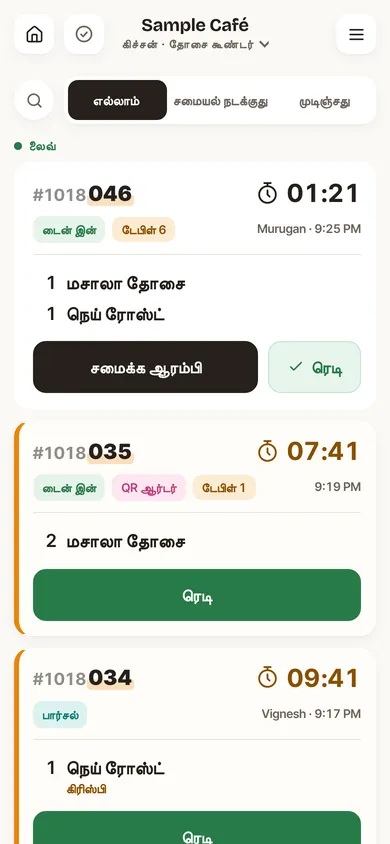
Delobee kitchen screen in Tamil with tickets and timers — sample data
Kitchen screen in Tamil · sample data

03KOT printing

Waiter phones never talk to the printer. One print station per printer picks up each ticket and prints it — so waiters can use any phone, iPhones included.

Option 1 · simplest

Android phone or tablet + BLE or USB printer

If your kitchen screen is an Android device, connect a 58 or 80 mm ESC/POS printer to it from the kitchen screen in Chrome. Nothing else to buy.

  • USB with an OTG cable is the most reliable — it reconnects by itself.
  • Bluetooth printers must support BLE (look for “BLE” or “Bluetooth 4.0 dual mode”).
  • Keep the kitchen screen open, on and plugged in.
Option 2 · Wi-Fi or Ethernet printers

Network printer + the Delobee print bridge

Run the Delobee print bridge on any always-on device on your restaurant network. Good for network printers or an all-iPhone team.

  • A Raspberry Pi, an old laptop, or a spare Android phone can run it.
  • Can drive more than one printer, e.g. kitchen and juice bar.
  • Send a test ticket from Settings to check it works.

What doesn’t work

  • An iPhone or iPad as the print station (it can still be a waiter phone).
  • Bluetooth printers that only support “Classic” Bluetooth, not BLE.
  • Tamil text on KOTs — printer fonts have no Tamil, so use English dish names.

04What prints

The kitchen knows exactly what changed.

Each KOT shows the KOT number, station, table or order type, waiter, time, dishes, quantities and notes. No prices.

WhenThe ticket saysWhat it shows
New orderNEWEvery dish, split by kitchen station
Dishes addedADDED ITEMSOnly the new dishes
Order changedORDER CHANGEDExtra quantities, and cancelled ones as “CANCEL 1 x Dish”
Table movedORDER CHANGED“Moved from table X”
Bill voided before servingCANCELLEDSent to every station that had the dishes
ReprintREPRINTThe same ticket, marked as a reprint
  • No duplicates. One ticket per send per station, even after retries or an offline sync.
  • Retries on its own. A failed print is retried for about 10 minutes, then shows as failed so you can reprint.
  • No flood after downtime. Tickets older than 30 minutes aren’t auto-printed, but can be reprinted.

05What to buy

What you need — and what you don’t.

Start with phones only. Add a printer later if your kitchen wants paper.

SetupYou needRough market price
Kitchen screen onlyAny phone or tablet you already have₹0 extra
Option 1Android phone/tablet + 58 mm BLE or USB thermal printerabout ₹2,000–3,500 for the printer
Option 280 mm Ethernet/USB kitchen printer + an always-on device for the bridgeabout ₹3,500–6,000 for the printer; a Raspberry Pi Zero 2 W is about ₹2,000

Printer prices are rough estimates for common models in India; check current prices with your supplier. Delobee doesn’t sell hardware. Printing costs nothing extra in Delobee.

06FAQ

Kitchen questions.

Questions about price or trial? See pricing and the main FAQ.

Do I need a KOT printer to use Delobee?

No. The kitchen screen works on any phone or tablet without a printer. Printing is optional and only starts once you connect a printer.

Which printers work?

58 mm or 80 mm ESC/POS thermal printers. Connect a BLE or USB printer to an Android phone or tablet running the kitchen screen in Chrome, or use Wi-Fi/Ethernet printers through the print bridge on your restaurant network.

Can an iPhone print KOTs?

An iPhone works fine as a waiter phone, and its orders print at your print station. But an iPhone or iPad can’t be the print station itself, because Safari can’t connect to Bluetooth or USB printers. Use an Android device or the print bridge.

Does the KOT show prices?

No. A KOT shows the KOT number, station, table or order type, the waiter, the time, the dishes with quantities and any notes. Prices only appear on the bill.

Will a KOT print twice if the internet drops?

No. There is one ticket per order send per station, and retries or offline syncs never print a duplicate. A failed print is retried for about 10 minutes, and anyone can reprint a ticket.

Can KOTs print in Tamil?

Not yet. Thermal printer fonts have no Tamil letters, so use English dish names if you print KOTs. Staff screens can still be in Tamil.

Can the juice bar and kitchen have separate screens?

Yes. Give each counter its own station, such as Main kitchen, Juice bar or Desserts. Each screen can show one station or all orders, and each station gets its own KOT.

Set up your kitchen screen in practice mode.

Pick your counters, send a sample order and watch it arrive. Connect a printer whenever you’re ready.

14 days free · no card needed · ₹799/month or ₹7,699/year after